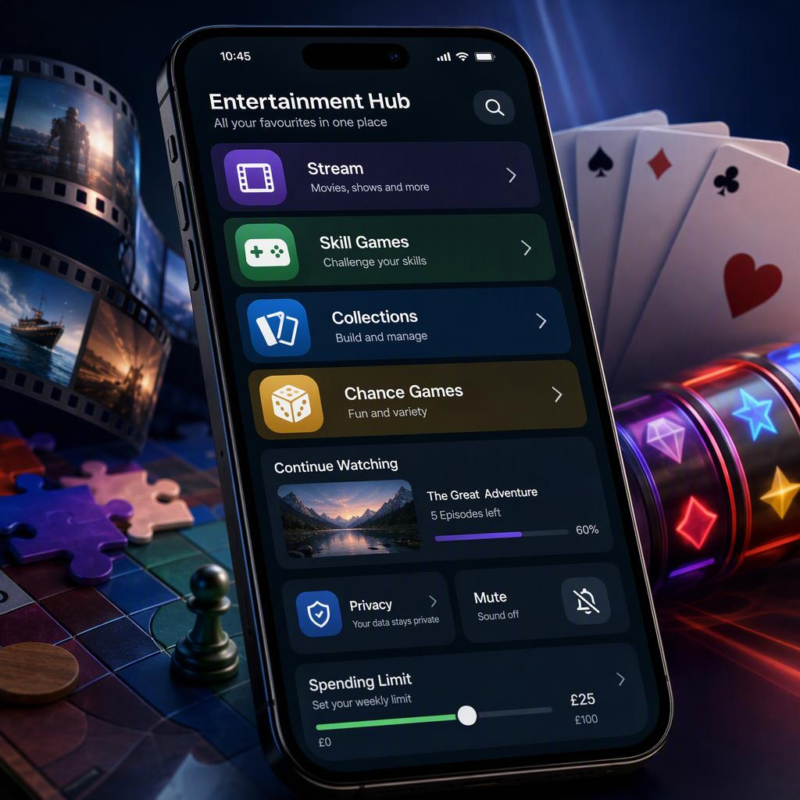
Open almost any entertainment app on your phone and you’ll spot something familiar within seconds. A bright play button, a recognisable symbol, a progress bar, a favourite icon, perhaps a row of suggested titles. These details may look small, but they do a great deal of work.
Familiar visual themes and quick feedback help people understand an experience without having to study a manual.
Whether you’re browsing a streaming service, trying a mobile puzzle game or looking through a digital catalogue, good design gives you useful clues about what happens next.
That doesn’t mean every form of digital entertainment works in the same way, of course. A skill-based game, a collection-based app and a chance-based service can all use colourful interfaces and reward signals, while having very different rules and outcomes. Knowing the difference makes it easier to choose what suits you and use it with clear expectations.
Colour, sound and interface cues do more than make a screen look nice
Presentation is often the first thing we notice. Colour, contrast, icons, typography and sound all help set the tone, but they also affect how easy a service is to use.
A familiar theme can make an interface feel approachable. Think of genre labels, recognisable card shapes, wheel icons, film-strip imagery or themed backgrounds.
These visual shortcuts help users work out where they are and what a button is likely to do. On a smaller mobile screen, that clarity matters even more.
A well-designed interface should support a few practical things:
- Discovery, so you can find categories, search tools and recommendations without endless scrolling
- Readability, with clear text sizes, sensible spacing and labels that explain themselves
- Accessibility, including strong colour contrast, captions where relevant and controls that don’t rely on colour alone
- Expectation-setting, so it’s obvious whether you’re watching, buying, competing, collecting or taking part in a chance-based activity
Sound plays a part too. A short confirmation tone can tell you that a setting has been saved. A subtle alert may flag a new episode or a completed download. The key word is “subtle”. If every tap produces noise, it becomes tiring rather than helpful.
Many of us have had the experience of opening an app that looks polished but feels confusing. The buttons are vague, important information is buried, or the interface keeps moving things around.
Attractive design is useful, but it should never come at the expense of understanding what you’re agreeing to or how a service works.
For mobile users, a few details are particularly worth noticing:
- Can you read essential information without zooming in?
- Are key controls clearly labelled?
- Is sound optional, with a visible mute setting?
- Are terms, privacy settings and account controls easy to locate?
- Does the design make it clear when you’re moving from browsing into a transaction or regulated activity?
Those checks aren’t glamorous, but they are a decent test of whether an app respects its users.
Progression is not always the same thing as chance
Modern digital entertainment often uses progression mechanics. You might level up a character, complete a series, unlock a new area, build a collection or receive a badge for finishing a task.
These systems give people a sense of direction, especially in experiences that could otherwise feel a little open-ended.
In skill-based video games, progression is commonly linked to what you do. Completing a difficult section, learning a new control scheme or making better tactical choices can lead to a higher rank, a new ability or a change in the story. The result may be shaped by the game’s rules, but your decisions and practice are central.
Collection systems work differently again. They can organise films into watchlists, music into libraries or digital items into sets. They provide structure and a reason to return, yet they do not necessarily involve competition or financial stakes.
Chance-based game structures are separate. Their outcomes are determined by random processes rather than by a player’s skill or persistence.
A slot game, for example, uses a random number generator to determine results. Familiar themes, symbols and animations may make such games easy to recognise, but they do not alter that underlying chance-based structure.
That distinction is important. Similar-looking features can mean different things depending on the product:
| Feature | Skill-based game | Collection or streaming app | Chance-based game |
|---|---|---|---|
| Progress bar | May reflect completed tasks or story progress | May show viewing or download progress | Does not predict an outcome |
| Rewards | Often linked to performance or completion | Can be badges, saved titles or recommendations | Outcomes are chance-based |
| Visual theme | Sets mood and communicates genre | Helps browsing and categorisation | Frames the game’s symbols and presentation |
| User control | Practice and decisions can affect in-game performance | Choices affect what you watch or save | No action can change a random result |
It’s easy to blur these categories because many services use common design language. A notification, a badge or a colourful animation may all signal “something happened”. But the purpose behind that signal can be entirely different.
The plainest rule is this: where an activity is chance-based, treat it as chance-based. No amount of familiarity with the theme, or time spent looking at previous outcomes, gives a reliable way to predict the next one.
Mobile-first usability is where the real test begins
A clever interface can still be frustrating if it hasn’t been designed for a phone. Mobile-first usability is about the practical experience of using a service one-handed, on a modest screen, with an unreliable signal and a limited amount of patience.
Touch targets should be large enough to tap without hitting the wrong option. It sounds obvious, but cramped menus are still everywhere. Buttons for account settings, spending controls and help should be as easy to find as promotional material or featured content.
Loading performance matters as well. Heavy animations and auto-playing elements can make a service feel sluggish, particularly on mobile data.
A good platform should communicate when content is loading, allow you to pause or reduce motion where possible, and avoid leaving you unsure whether a tap has registered.
Before you settle into any new entertainment service, it’s sensible to check:
- Whether you can manage notifications rather than receiving them by default
- How to change or delete account details
- What information the service collects and why
- Whether there is a clear contact route for support
- How subscriptions, purchases or payments are shown before confirmation
- Whether key conditions are readable on a mobile screen
- What happens if you want to close the account
These are not just technical details. They help you keep control over the experience rather than letting the experience dictate the terms.
For account security, use a unique password rather than reusing one from another service. Where available, turn on two-step verification.
It may add a moment when signing in, but it is far less inconvenient than sorting out an account that has been accessed by someone else.
Safer digital entertainment habits are part of good design
Using digital entertainment comfortably isn’t only about choosing a good interface. It is also about setting boundaries that work for you.
Start with privacy. Read the essentials of a platform’s privacy notice, especially if it asks for personal details, location data or access to contacts. You don’t need to memorise every paragraph, but you should understand what you’re handing over and how to adjust permissions later.
Then look at account security and spending visibility. If a service involves payments, check that it provides clear records of transactions and makes it straightforward to review activity. Keep device software updated, avoid logging in through unfamiliar public Wi-Fi where possible, and sign out of shared devices.
For adults using regulated gambling services, safer-play tools deserve particular attention. These are not decorative menu items. They are controls intended to help people set and maintain their own boundaries.
Depending on the operator, useful options may include:
- Deposit limits, which can restrict the amount added to an account over a chosen period
- Time-outs, allowing a temporary break from the service
- Self-exclusion, a longer restriction from gambling services
- Reality checks or activity summaries, which can make time and spending easier to review
- Transaction histories, so account activity is visible rather than guessed at
In Great Britain, the Gambling Commission’s safer gambling information is a useful starting point for understanding consumer protections and support routes. Anyone considering a regulated gambling service should be aged 18 or over, read the operator’s terms, and find its responsible-play controls before using it.
A healthy habit is to decide your limits in advance, when you’re not distracted by the activity itself. If something no longer feels comfortable, use the available tools and step away. Entertainment should remain a choice, not something that crowds out the rest of your routine.
A UK-focused explanation of themed chance-based games
Themed online slots are a clear example of how recognisable symbols, colour palettes, sound effects and simple tap-based controls can create an immediately understandable digital catalogue. The visual style may be familiar, but the games themselves are chance-based, and outcomes are not determined by skill.
That is exactly why the practical checks above matter. Adults should review the operator’s terms, privacy information, account settings and responsible-play options before engaging with any regulated gambling service.
Look for clear access to deposit limits, time-outs and self-exclusion tools, and make sure you understand how they work.
For an adult UK example of a themed online-slot catalogue, see Rainbow Riches Casino. The page is best viewed as a reference point for a familiar-theme, chance-based format, rather than as a substitute for reading the service’s terms and responsible-play controls. It is intended for adults aged 18 and over.
Familiar design can make digital entertainment easier to navigate, but it shouldn’t replace clear information. The strongest apps and services combine appealing presentation with plain language, useful controls and enough transparency for you to make an informed choice.