

Low-quality videos are no longer a dead end. Whether you are working with blurry smartphone clips, compressed social media footage, or old recordings, AI video enhancers—and, if you need to create content from scratch, an AI video generator—now make it possible to significantly improve video quality with minimal effort.
In this guide, you will learn:
- What an AI video enhancer actually does
- The core features shared by top tools
- What most ranking pages fail to explain
- How to choose the right enhancer for your use case
- How to enhance videos step by step using EaseMate AI
This article is designed to help you make better decisions, not just click a tool and hope for the best.
What Is an AI Video Enhancer?
An AI video enhancer is a software tool that uses machine learning models to analyze video frames and intelligently improve quality.
Unlike traditional upscaling, which simply stretches pixels, AI enhancement attempts to reconstruct missing details, reduce noise, and optimize visual clarity.
AI Video Enhancer vs Traditional Upscaling
- Traditional upscaling: Enlarges resolution without adding detail
- AI video enhancement: Predicts and restores detail based on learned patterns
This is why AI tools are particularly effective for:
- Blurry videos
- Low-resolution footage
- Old or compressed files
Common Features Found in Top AI Video Enhancers
Most AI video enhancement tools on the market share the following core features:
Upscaling to HD or 4K
Most AI video enhancers allow users to upscale videos from SD or 720p to 1080p or 4K, improving perceived sharpness and clarity.
Noise Reduction and Blur Removal
AI models detect visual noise, compression artifacts, and motion blur, then selectively clean them without heavily damaging edges.
Automatic Color and Contrast Enhancement
Many tools automatically adjust brightness, contrast, and saturation to produce a more balanced image.
Online, One-Click Workflow
- No software installation
- Browser-based processing
- Simple upload → process → download flow
Key Features to Compare When Choosing an AI Video Enhancer
When evaluating tools, consider more than just “free” or “4K.”
| Feature | Why It Matters |
| Upscaling quality | Determines realism and sharpness |
| Noise handling | Prevents plastic or over-processed results |
| Color correction | Improves visual balance |
| Ease of use | Reduces learning curve |
| Artifact control | Avoids unnatural output |
EaseMate AI Video Enhancer: Features and How to Use It
EaseMate AI Video Enhancer is designed for users who want fast, practical improvements without complicated controls.
What EaseMate AI Does?
EaseMate AI uses advanced AI models to:
AI Upscaling to 4K
EaseMate AI reconstructs details rather than simply resizing frames, resulting in clearer edges and improved definition.
Automatic Color Optimization
The system intelligently adjusts brightness, saturation, and contrast to produce a more natural and visually appealing result.
Noise and Artifact Reduction
Compression noise, grain, and low-light artifacts are reduced without excessive smoothing.
How to Enhance a Video Using EaseMate AI
- Upload Your Video

Drag and drop your video file into the EaseMate AI video enhancer. Common formats such as MP4 and MOV are supported.
- Select Output Settings and Generate
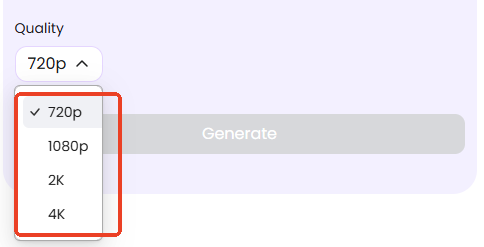
Choose the desired output resolution (for example, 4K) and start the AI enhancement process.
- Preview and Download

Once processing is complete, preview the enhanced video and download the final result.
This workflow is designed to be completed in minutes, even for first-time users.
Best Use Cases for EaseMate AI
- Improving social media videos
- Enhancing smartphone recordings
- Cleaning up compressed online videos
- Preparing footage before manual editing
Expert Tips for Better AI Video Enhancement Results
- Start with the highest-quality source file available
- Avoid extreme upscaling on very noisy videos
- Use AI enhancement as a first step, not the final edit
- Compare before and after results critically
Subtle improvements often look more realistic than aggressive enhancement.
FAQs
Is AI video enhancement better than traditional upscaling?
Yes, for most low-quality footage, AI enhancement produces more natural results.
Can AI add fake details to videos?
AI predicts missing details, which may sometimes look artificial if overused.
How long does AI video enhancement take?
Processing time depends on video length and resolution, but most tools complete tasks within minutes.
Conclusion
AI video enhancers have changed how users improve video quality. Instead of complex editing workflows, modern tools allow anyone to enhance videos quickly and effectively.
While many tools focus only on speed and simplicity, understanding how AI enhancement works, its limitations, and best use cases leads to better results. EaseMate AI stands out as a practical option for users who want fast, high-quality enhancement without unnecessary complexity.
If your goal is to improve video clarity, upscale resolution, and restore visual quality with minimal effort, AI video enhancement is no longer optional—it is the new standard.
