You’ve budgeted $200 for AI video generation this month. You have a clear vision: product animations for your landing page, a few image to video conversions of your existing product shots, some cinematic B-roll clips for your brand film, and maybe one ambitious narrative scene with consistent characters.
Two weeks later, your credits are gone. You have three usable clips, seven mediocre ones, and twelve outright failures hiding in your downloads folder.
Welcome to the hidden cost of AI video.
In this guide, we’ll move you from “trial-and-error gamer” to “strategic operator.” Whether you’re managing a solo creative budget or allocating resources across a team, the principles below will fundamentally change how you spend on AI video.
Why Your AI Video Budget is Disappearing?
The “Trial-and-Error” Trap: Why Guessing Prompts Leads to Wasted Credits
Every failed generation is a micro-transaction you can’t get back. A 5-second clip on a premium model might cost 30-80 credits.
Generate that four times because your prompt was vague, and you’ve burned 120-320 credits for one usable result.
AI models don’t think like directors. They think like statistical pattern matchers. Vague emotional descriptors, ambiguous spatial relationships, and unstated stylistic assumptions all create variance — and variance means more iterations to land something usable.
Model-Choice Confusion: How Using a High-End Model for Simple Tasks Drains Your Wallet
This is where most budgets hemorrhage silently.
AI video models aren’t priced linearly. A top-tier model optimized for complex narrative scenes (character consistency, physical accuracy, cinematic motion) might cost 5-10x more per second than a lightweight model designed for simple cinemagraphs and product motion.
The mistake: Using your “best” model for everything.
That premium model can animate a product rotating on a clean background. But so can a model that costs one-fifth of the credits — and for simple motion with clean edges, the visual difference is negligible.
The key insight: Model selection is a cost decision, not just a quality decision.
This is exactly where a platform like Aireel changes the economics. Rather than subscribing to five different AI video tools and manually deciding which one to use for each task, Aireel’s routing layer automatically directs your prompt to the most cost-efficient model capable of delivering the quality your task requires.
You’re not paying premium prices for simple motion — and you’re not expecting budget models to handle complex narrative work.
The Professional Workflow: Model Routing
What is Model Routing? Defining the Strategy of Matching Task Complexity to Model Capability
Model Routing is the practice of systematically matching the complexity of your creative task to the specific capability profile — and credit cost — of the optimal AI model for that job.
The three dimensions of Model Routing:
- Complexity Assessment: How difficult is this task? (Simple motion vs. narrative scene vs. physical simulation)
- Capability Mapping: Which model architecture is optimized for this type of complexity?
- Cost Optimization: What’s the cheapest model in that capability tier that can deliver the required quality?
Without Model Routing, you’re either overspending on simple tasks or underspending on complex ones — which leads to failed generations, which leads to even more overspending as you retry.
This is why professional workflows separate task analysis from generation. Before you spend a single credit, you answer: What is this clip actually trying to do?
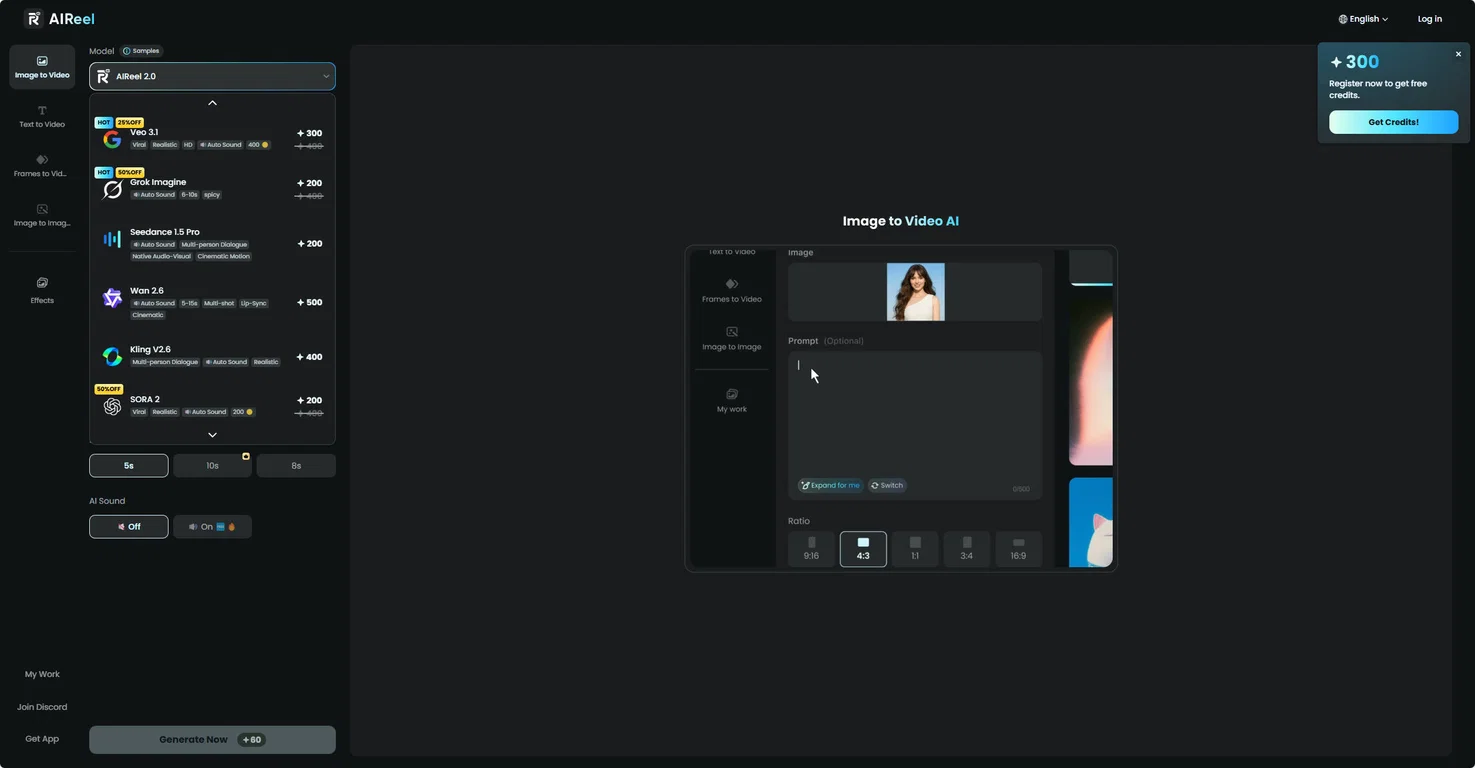

Platforms that offer intelligent routing like Aireel automate this escalation analysis. Instead of manually testing across multiple models, the system evaluates your prompt complexity and routes to the optimal cost-quality intersection.
For teams managing multiple creators, this removes the guesswork that otherwise burns through shared credit pools.
Strategic Tips to Reduce Wasted Credits
The “Low-Res First” Rule: Using Draft Generations to Test Motion Before Committing to High-Res/Long-Duration Credits
The Low-Res First Rule is simple:
Never commit to full-resolution, full-duration generation until you’ve validated three things:
- Motion accuracy: Does the subject move the way you intended?
- Temporal coherence: Are there jarring artifacts, flickers, or morphing?
- Composition: Is the framing and camera movement what you wanted?
The workflow:
- Draft Phase: Generate at 480p or 720p, 3-4 seconds duration. This costs 15-25% of the final credit price.
- Validation Phase: Review for the three criteria above. Iterate on your prompt if needed — cheap iterations.
- Production Phase: Only when the draft is clean, scale to full resolution and duration.
Conclusion: Investing in Strategy Over Credits
The AI video generation landscape will continue evolving. Models will improve, pricing will shift, and new capabilities will emerge monthly.
But the fundamental principle won’t change: the creators who spend strategically will always outperform those who spend heavily.
Moving from a “generate and hope” workflow to a Model Routing workflow isn’t about being cheap — it’s about being effective. It’s about recognizing that your budget is a finite resource and that every credit spent on the wrong model is a credit not spent on creative iteration.
Aireel was built precisely around the Model Routing philosophy: intelligent task-to-model matching that optimizes for both quality and cost without requiring you to become an expert in five different AI video platforms.
Stop burning credits on model confusion. Start routing strategically.